How to Use Rapid Application Development

How to Use Rapid Application Development: The Corteza low-code Platform leads the way in the field of open-source low-code development. That’s because…

Niall McCarthyPlanet Crust 3 min read

The Corteza low-code Platform leads the way in the field of open-source low-code development. That’s because it’s flexible and intuitive. And it delivers results in a fraction of the time it takes others to get similar outcomes.

Though inspired by Salesforce “Lightning”, Crust improves the build process, making it more agile and responsive to your requirements. However, thought and planning should go into the creation of any applicative software, smart apps or bpms tool etc. This should be the case irrespective of which application development trends you’re following.

Like All IT Projects, Rapid Application Development Should Be Planned Carefully

Just because you’re going to get great results more efficiently and with a greater return on investment doesn’t mean you should cut corners on the preparation. For instance, if you have a customer-focused approach, you should define the use cases and commercial benefits clearly. If you’re building a BPMS tool, you need to document your processes clearly and get buy in from all the stakeholders. Corteza can make a great open-source BPMS, but if you don’t apply it to the right context, then you’ve missed the point.

Thinking hard about your data model is a great place to start. The Corteza low-code development platform makes building a data model clear and straightforward. That’s even whether the desired data model is simple or complex. Building advanced CRM tools, state-of-art record management software or even integrations to popular software such as Jira from Atlassian all start by investigating the data model.

User Friendly Applications with Low-Code

Great applications should also be user friendly. The Corteza low-code platform allows you to overlay your web user experience (UX) in a myriad of ways over your data model(s). For example, the look and feel of the Crust’s CRM Suite data model can be tailored. You can make it look like Salesforce, Microsoft Dynamics or Sugar CRM.

The art of UX is about creating meaningful and intuitive user journeys in the system. And in such a way that the application both looks and feels and user centric. That’s not just technology, but also psychology. Education Management Systems are motivated by completely different rationale than open-source CRMs. The “why” is key to user acceptance. For example, what is a BPMS (Business Process Management System) without user acceptance? Well, it would be failure, for sure!

However, imagine a smart schooling application which deliberately takes into account:

  • Students
  • Teachers
  • Supervisors
  • Administrative staff
  • Capital Assets (e.g. school buildings)
  • Educational Resources
  • Third Party Relationships (e.g. businesses for work placements)
  • All processes which make the above interdependent

That’s a lot to think about and we’re still only scratching the surface. What about reporting? For example, how do we create engaging dashboards so that a user can understand at a glimpse:

  • Key performance indicators
  • Project status
  • Comparative charts

Open-source dashboards and reports

What is open-source case management without great dashboards and reports? Would you dare create a clinic case management system without granular charts? Or an application to deliver cloud computing for healthcare without reports? Luckily, the Corteza low-code development platform delivers a powerful solution here too.
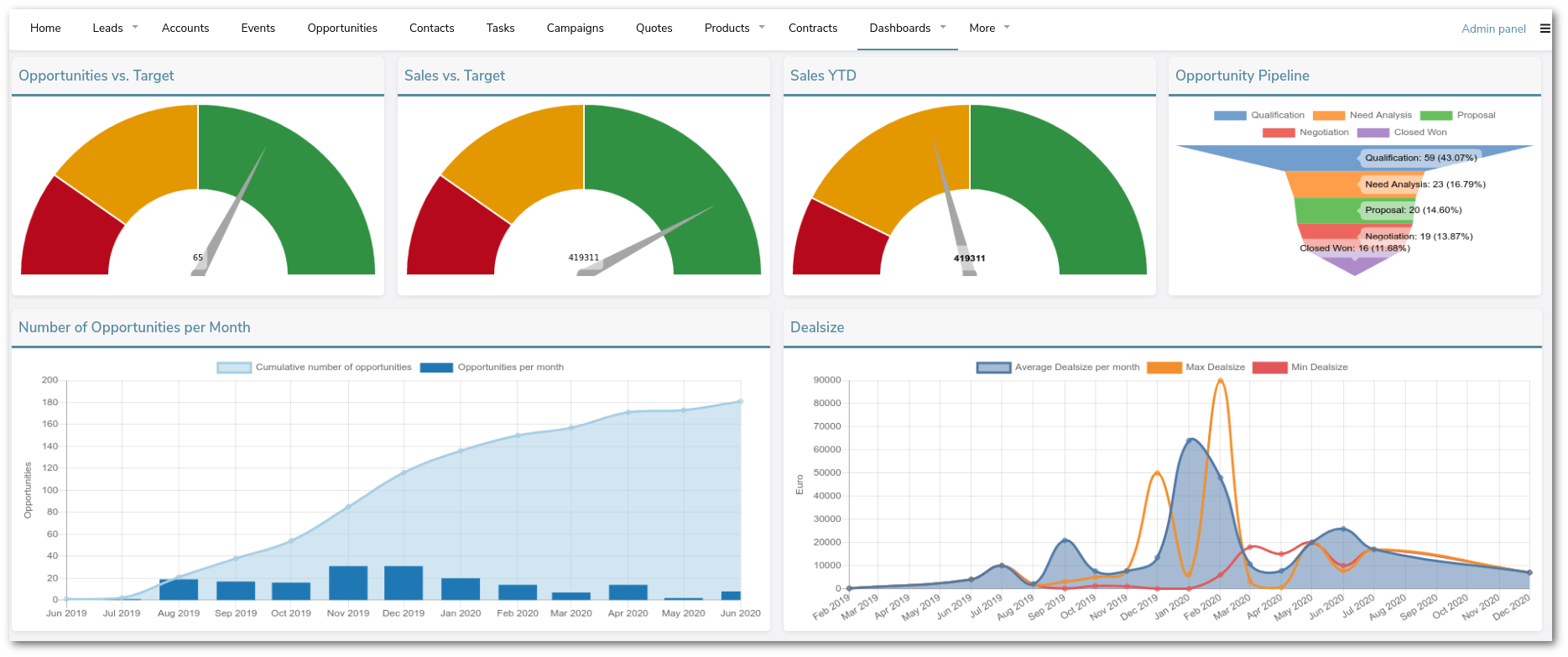
As a leading application development platform, the Corteza open-source low code development platform can improve your business, its processes and its evolution. This is as true for specific requirements as it is for an entire digital transformation strategy. But please remember, nothing replaces disciplined and careful planning 🙂

#Charts#Dashboard#Low Code Platform#Low-code#Salesforce alternative#UX

Found this useful? Share it.

Written by

Niall McCarthy

More articles by Niall
Sales

Talk to our sales team

Planning @Human for your organisation? Tell us a little and the right person will get back to you.

  • Plans, support and licensing explained
  • Pilot and rollout options
  • Answers from the team that builds @Human

We reply within one working day.

Your enquiry

A few details so we can prepare.

General enquiries

Get in touch

Press, partnerships, careers or anything else. Send us a note and the right person will reply.

  • Press and media
  • Partnerships and community
  • Careers and everything else

Questions about buying @Human? Talk to our sales team.

Your message

We'll reply by email.

Quote

Ask for a quote

Tell us what you need and we'll prepare a written quote for your organisation.

  • Support plans with an SLA
  • Enterprise Support with a named engineer
  • Build, pilot and rollout services

Quotes are free, and the decision is always yours. Prices exclude VAT.

Quote details

The more we know, the more precise the quote.

Newsletter

News from @Human

Product updates, governance tips and early-access news, about once a month.

  • What's new in @Human
  • Practical EU AI Act and ISO 42001 notes
  • Unsubscribe in one click, any time

Your email stays private with us.

Subscribe

Just your email is enough.

Token savings

Estimate what you could save on tokens

Tell us about one process that runs on AI today. We'll map which steps need a model and which can run as token-free code.

  • Which steps need judgement, and which run as code
  • A rough before-and-after of your token bill
  • Ideas you can use whatever you decide

Estimates are illustrative. Real costs depend on your model, provider and volumes.

Get your estimate

A specialist replies within one working day.

Not-for-profit free build

Apply for a free governed AI application

For charities, NGOs and community groups. We build your first @Human application free of charge.

  • Governed from the first line
  • Cheap to run, protects the people you serve
  • Yours to keep and run

We reply within one working day to arrange a scoping call.

Your application

A few details about your organisation and what you'd build.

Enterprise pilot

Plan your @Human pilot

Start with one AI system that matters, prove the value, then standardise what works across the enterprise.

  • Policies, risk and approval gates set up with you
  • Your cloud, your models, your data
  • A clear path from pilot to portfolio

We reply within one working day to plan next steps.

Tell us about your pilot

Two minutes now saves a meeting later.

Ask us anything

Ask your own question

Security, compliance, integration, cost or anything else. A real person replies.

  • An answer within one working day
  • From the team that builds @Human
  • Routed to the right specialist on our team

Prefer to see it live? Book @Human Walkthrough from any page.

Your question

We'll reply by email.

Early access

Reserve your @Human plan

Pick what you'd like to pay. Today is free: we'll email you when your early access place opens.

  • €0 due today
  • The same platform at every amount
  • Change or cancel at any time

@Human is in early access. We email you before anything is charged.

Your reservation

Three short steps.

Plan€10 a month
Due today€0.00

€0 due today. @Human is in early access. Reserving your plan puts you on the list, and we will email you before anything is charged. You can change or cancel at any time.

20-minute walkthrough

See @Human at work with your use cases

Bring a use case you're planning. We'll show you how to build it in @Human as a compliance-first AI system.

  • Built around your own use case
  • How it's classified, governed and evidenced
  • Which plan fits, honestly

Your pace, your decision. A real conversation.

Book your walkthrough

We reply within one working day to find a time.