Version préliminaire

KoboToolbox Integration

KoboToolBox has the ability to create custom forms to suit your data collection needs.. KoboToolBox and Corteza have synergistic properties.

lennyPlanet Crust 3 min read

Background

“KoboToolbox is a suite of tools for field data collection for use in challenging environments. Our software is free and open source. Most of our users are people working in humanitarian crises, as well as aid professionals and researchers working in developing countries. Our teams of developers and researchers are based in Cambridge, MA and many other places around the world.””

Source: https://www.kobotoolbox.org

How KoboToolBox can be used with Corteza

One of the key features of KoboToolBox is the ability to create custom forms to suit your data collection needs. These forms can be accessed either Online or Offline allowing for their use in environments where internet connection is not possible.

Due to Corteza being a Web Based application an active internet connection is required to use Corteza. This allows Corteza to remain lightweight and usable on machines regardless of their processing power. This also means that Corteza may not be an adequate solution for use in the field.

This means that KoboToolBox and Corteza have synergistic properties where KoboToolBox can be used to collect the required data and once an internet connection is reestablished the data can easily be pushed to Corteza for  effective processing and management.

Understanding The Corteza Api Gateway

Due to the APi-Centric design of Corteza Corteza can connect to any provider using REST Protocols. This can easily be accomplished by using the Integration Gateway feature of Corteza.

The full documentation for the integration gateway can be found here: https://docs.cortezaproject.org/corteza-docs/2022.9/integrator-guide/compose-configuration/index.html

Creating an Endpoint

Here we can see the endpoint “/crm/leads” has been created. The full address of the endpoint is “https://latest.cortezaproject.org/api/gateway/crm/leads”. This will serve as the endpoint for the data to be sent to, we also select the “GET” method from the dropdown menu.

We also see the Prefiltering,Processing and Postfiltering options. Once the data payload has been created and sent to Corteza we then need to process the payload. This can be done by creating a Workflow in Corteza. More information on Workflows can be found here: https://docs.cortezaproject.org/corteza-docs/2022.9/developer-guide/corteza-server/workflows/

Sending a request in KoboToolbox

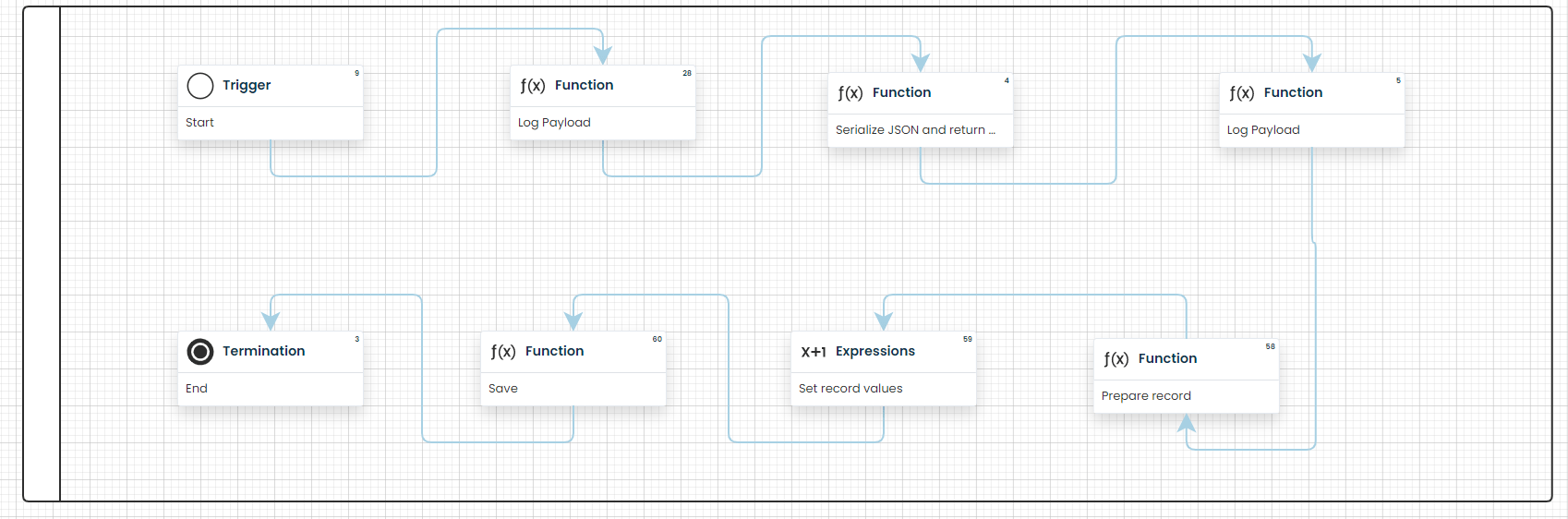
KoboToolbox allows for REST services to be activated directly from the settings menu. In this example we will use the settings in the image below. KoboToolbox will then trigger the requests and perform the service. More documentation on this topic can be found here: https://support.kobotoolbox.org/rest_services.html
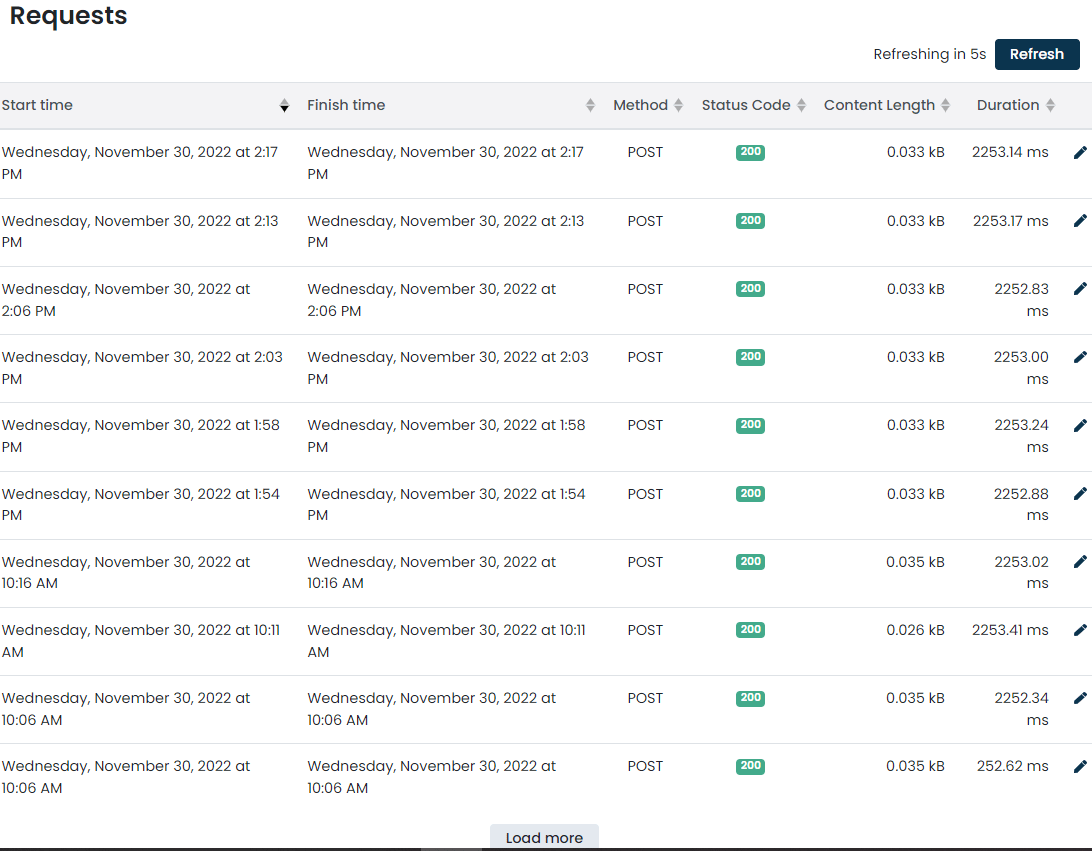
By enabling the profiler in the Corteza integration gateway page we can see the status of the requests. By clicking on a request we can see more information such as the  request route, the header settings and the body of the request.
Processing the payload

Once the payload has been received by Corteza, the data may need to be processed into a specific record page and we can do this using Corteza’s Workflow Builder. An example of a workflow processing a payload can be found in the image below.
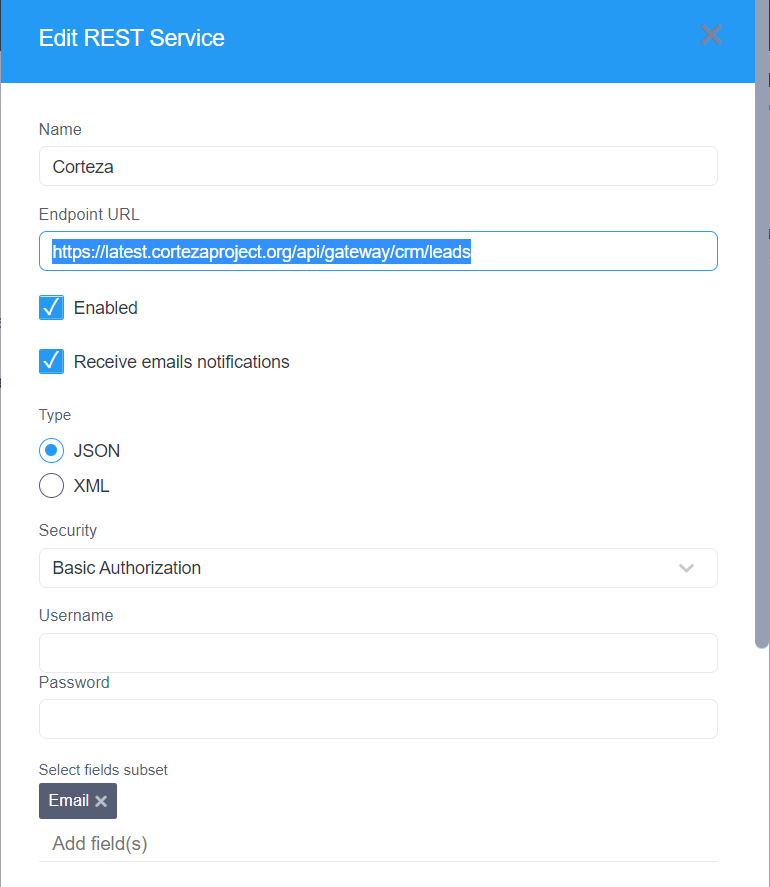
The output of this workflow will create a new record page containing the data found in the payload.

#API#Corteza#Gateway#Integration

Found this useful? Share it.

Written by

lenny

More articles by lenny
Sales

Talk to our sales team

Planning @Human for your organisation? Tell us a little and the right person will get back to you.

  • Plans, support and licensing explained
  • Pilot and rollout options
  • Answers from the team that builds @Human

We reply within one working day.

Your enquiry

A few details so we can prepare.

General enquiries

Get in touch

Press, partnerships, careers or anything else. Send us a note and the right person will reply.

  • Press and media
  • Partnerships and community
  • Careers and everything else

Questions about buying @Human? Talk to sales instead.

Your message

We'll reply by email.

Quote

Ask for a quote

Tell us what you need and we'll prepare a written quote for your organisation.

  • Support plans with an SLA
  • Enterprise Support with a named engineer
  • Build, pilot and rollout services

Quotes are free and without obligation. Prices exclude VAT.

Quote details

The more we know, the more precise the quote.

Newsletter

News from @Human

Product updates, governance tips and early-access news, about once a month.

  • What's new in @Human
  • Practical EU AI Act and ISO 42001 notes
  • Unsubscribe in one click, any time

We never share your email.

Subscribe

Just your email is enough.

Token savings

Estimate what you could save on tokens

Tell us about one process that runs on AI today. We'll map which steps need a model and which can run as code that costs nothing in tokens.

  • Which steps need judgement, and which don't
  • A rough before-and-after of your token bill
  • Ideas you can use whatever you decide

Estimates are illustrative. Real costs depend on your model, provider and volumes.

Get your estimate

A specialist replies within one working day.

Not-for-profit free build

Apply for a free governed AI application

For charities, NGOs and community groups. We build your first @Human application at no build cost.

  • Governed from the first line
  • Cheap to run, protects the people you serve
  • Yours to keep and run

We reply within one working day to arrange a scoping call.

Your application

A few details about your organisation and what you'd build.

Enterprise pilot

Plan your @Human pilot

Start with one AI system that matters, prove the value, then standardise what works across the enterprise.

  • Policies, risk and approval gates set up with you
  • Your cloud, your models, your data
  • A clear path from pilot to portfolio

We reply within one working day to plan next steps.

Tell us about your pilot

Two minutes now saves a meeting later.

Ask us anything

Ask your own question

Security, compliance, integration, cost or anything else. A real person replies.

  • An answer within one working day
  • From the team that builds @Human
  • No sales pressure

Prefer to see it live? Book @Human Walkthrough from any page.

Your question

We'll reply by email.

Early access

Reserve your @Human plan

Pick what you'd like to pay. Nothing is charged today: we'll email you when your early access place opens.

  • No payment today
  • The same platform at every amount
  • Change or cancel at any time

@Human is in early access. We email you before anything is charged.

Your reservation

Three short steps.

Plan€10 a month
Due today€0.00

No payment today. @Human is in early access. Reserving your plan puts you on the list, and we will email you before anything is charged. You can change or cancel at any time.

20-minute walkthrough

See @Human at work with your use cases

Bring a use case you're planning. We'll show you how to build it in @Human as a compliance-first AI system.

  • Built around your own use case
  • How it's classified, governed and evidenced
  • Which plan fits, honestly

No obligation. No sales deck.

Book your walkthrough

We reply within one working day to find a time.