
Corteza — OAuth2.0

On this page
The Corteza platform is a free and open-source low-code platform used to build and develop an organization’s key applications, with ease of use in a developer-friendly fashion.
Corteza is API-centric, meaning that you can achieve almost everything via API endpoints.
These key applications operate within a business to promote growth and improve productivity whilst protecting your organisation’s privacy and protected information. This version of Corteza implements the OAuth2.0 authentication framework, which allows for internal and external authentication.
What we will be learning
The article intends to educate the user in Corteza authentication and authorization creation process to your own local/ offline instance.
We go further into the OAuth2.0 framework purpose, why is it used and which flow was chosen for this article.
Finally, we move onto step-by-step processes on setting up an authentication client and generating an access token.
For a complete description of the protocol, please refer to the OAuth 2.0 Specifications.
Why OAuth2.0:
- OAuth has become the industry standard due to its wide use and effectiveness.
- Support for non-browser-based applications through OAuth Flows.
- OAuth 2.0 no longer requires client applications to have cryptography.
- OAuth 2.0 Access tokens are “short-lived”, limiting access with a refresh requirement.
- Provides a clean separation of roles between the server responsible for handling OAuth requests and the server handling user authorization.
Client credentials OAuth2.0 flow
The below picture simply describes the client credentials flow according to OAuth2.0 framework, it uses the generation of access tokens for a given set of requests.

With OAuth2.0, you can authenticate a third-party website or application and access system user protected resources without revealing their long-term credentials or identity.
OAuth allows access to a limited number of features for a limited period without providing total control to the user. It also sets out a role-based permissions framework that is employed without exposing your password, as it specifies role-related access delegation and authorization.
Corteza JWT token
Corteza uses bearer JWT tokens when authenticating HTTP requests; JWTs grant access to the system, so they should be treated as confidential.
The JWT token is uniquely generated against a specific client created in the corteza platform. Later will be a step-by-step guide on how to do this.
Below is a cUrl example statement the can be used to authenticate to your instance by simply changing the values encapsulated by “<>”.

If the auth client has sufficient permissions and the request is valid, the server response will be 200 containing a body with the below example json.

Step-By-Step Authentication
This details a Corteza authentication client creation and token generation using the “client credentials” OAuth2.0 flow.
We now go into further details on authentication and token generation steps:
- Retrieving the user ID.
- Create a new auth client.
- Prepare Auth Client Details.
- Prepare cUrl Request.
- Generate access token.
- Access token usage.
User ID and impersonation
In order to use client credentials OAuth2.0 flow, a user of the system with valid permissions is required to be impersonated. Below is an example of how to retrieve the user ID in the system.
Create Auth Client
Before you can obtain an access token, you will need to define an auth client and a system user. You can use an existing user (such as yourself) or create a dedicated user.
From the applications landing page, select “Admin Area”.

Navigate to auth clients page and create a new auth client
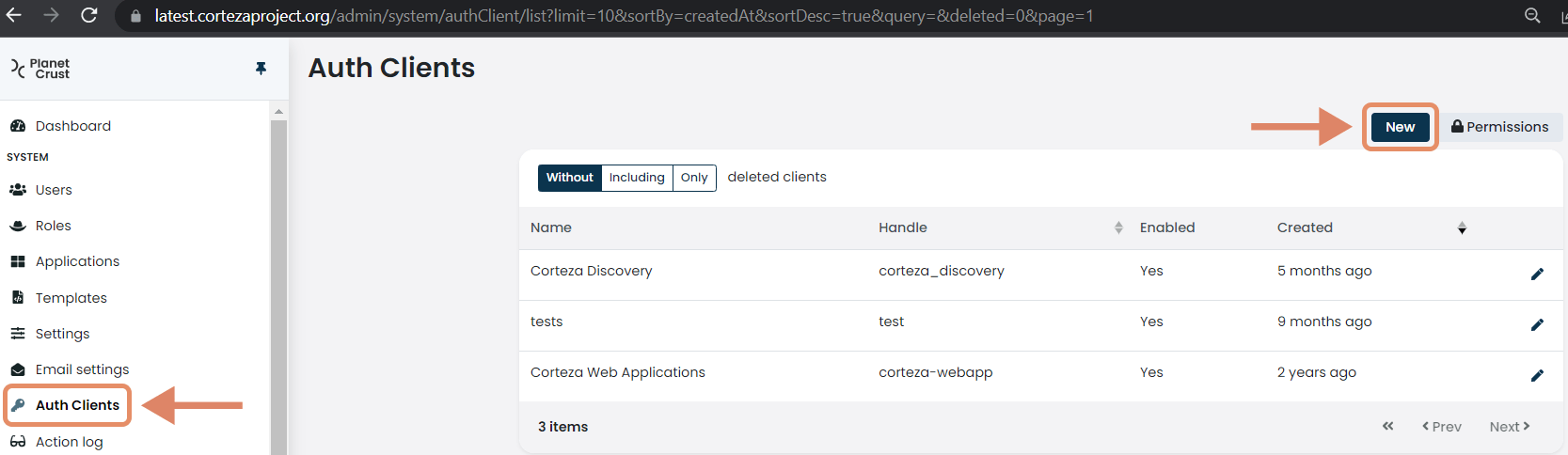
Enter auth client details and save the form. Make sure that the system user has sufficient roles and permissions to access the intended resources.

Prepare Auth Client Details
Once the client is saved, there will be uniquely identifiable details needed to generate a token. These details are used to generate a JWT token used to request an access token to Corteza.
Below is the client ID and secret, both of with are needed to generate the access token.
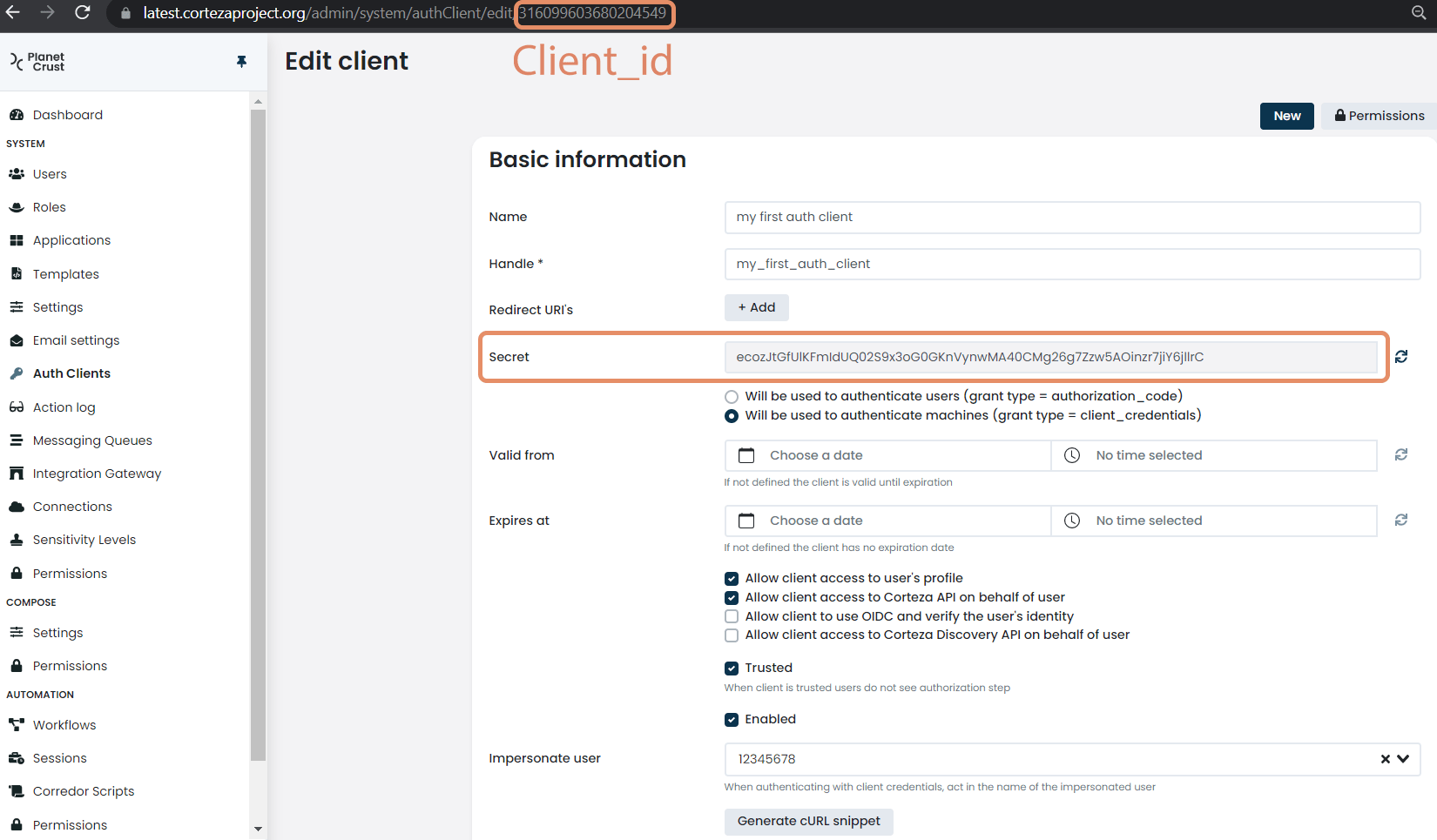
Client_id = this is the ID of the authentication client created and being accessed.
Secret = is the system generated secret key used in combination with the client ID.
Prepare cUrl Request
This step generates a code snippet that can be used to test the authentication to your corteza instance.
Please see below for a template cUrl request.

Generate Token
Via a bash or shell terminal, execute the curl command to receive the access token.

Access Token Usage
Each HTTP request to a protected resource in Corteza must provide a bearer token in the authorization header.
Below is an example of such a request.

