
Understanding and managing network coverage stand as pivotal challenges in the telecommunications domain. In this article we delve into the symbiosis of artificial intelligence and no-code development, unveiling the creation of a Network Coverage Map App. This innovative tool not only caters to businesses and individuals but also transforms the way we perceive and manage network strength in diverse locations. Exploring key features and a step-by-step guide, the article provides insights into the intersection of AI and no-code technology, offering a dynamic solution for navigating the complexities of modern connectivity.
What the App Does:

- Real-Time Network Coverage Visualization:
The app visualizes real-time network coverage on a map, providing users with a clear and intuitive view of the strength and availability of their mobile network.
- Differentiation of Network Strengths:
It differentiates between various network strengths, such as 3G, 4G, and 5G, using visual cues like colors or symbols.
- User Feedback System:
Users can actively participate by submitting feedback on their network experience. This information contributes to the dynamic updating of the coverage map.
- Legend or Key Explanation:
The app includes a legend or key that explains the symbols or colors used on the map, ensuring that users can interpret the information accurately.
Who the App is For:

- Mobile Network Users:
Primarily designed for individuals who use mobile networks, helping them assess the coverage quality in their area or in areas they plan to visit.
- Travelers:
Travelers can benefit by checking network coverage in different locations before planning trips, ensuring they stay connected on the go.
- Network Service Providers:
Network service providers can also use the app to gather user feedback, identify areas with connectivity issues, and enhance their services based on real-time data.
Benefits of the App:

- Informed Decision-Making:
Users can make more informed decisions when choosing a mobile network provider based on the actual experiences of others in their area.
- Improved User Experience:
By allowing users to submit feedback, the app contributes to a feedback loop that can lead to improvements in network infrastructure and services, ultimately enhancing the overall user experience.
- Efficient Travel Planning:
Travelers can plan their trips more efficiently, knowing in advance the expected network coverage at their destination.
- Provider Accountability:
The app promotes accountability among network service providers, encouraging them to address coverage gaps and improve service quality based on user feedback.
How to Build the App

Step 1: Define the Purpose and Features
- Purpose Definition:
Clarify Objectives: Clearly define why you’re creating the app. Are you aiming to provide users with real-time network coverage information, collect user feedback, or both?
- Feature Identification:
Map Display Features:
– Choose the mapping service you want to use (e.g., Google Maps, Mapbox).
– Decide on the granularity of the coverage data you want to display (city-level, regional, etc.).
- Network Strength Differentiation:
Determine how you’ll represent different network strengths visually. For example, use different colors for 3G, 4G, and 5G.
- User Feedback System:
– Specify the information you want users to submit (location, network strength, comments).
– Consider adding validation to ensure data accuracy.
- Legend or Key:
Decide on the format of the legend or key that explains the map symbols. This could be a pop-up, a dedicated section, or an interactive component.
Step 2: Choose a No-Code App Builder
- Research Platforms:
Evaluate different no-code platforms based on your project’s requirements.
Check reviews, community forums, and available documentation for each platform.
- Trial Periods:
If available, take advantage of trial periods to explore the capabilities of each platform.
Step 3: Set Up Your App Project
- Platform-Specific Steps:
– Follow the platform’s instructions to create a new project.
– Fill in project details, set up any necessary configurations.
Step 4: Design the User Interface (UI)
- Map Component:
– Drag and drop the map component onto your canvas.
– Configure settings such as default location, zoom levels, and map style.
- Legend/Key Component:
– Add a component to display the legend or key.
– Connect it to the map component for dynamic updates.
- Feedback Form:
– Design the feedback form, including form fields for location, network strength, and comments.
– Set up any necessary validation rules.
Step 5: Integrate Map Data
- Data Sources:
If your platform supports it, integrate data directly. Otherwise, explore using external services like Zapier to connect to your data source.
- Data Visualization:
Configure the map component to visualize your network coverage data.
Step 6: Implement User Feedback
- Form Integration:
– Connect the feedback form to a data storage solution.
– Set up notifications for new feedback submissions.
Step 7: Test Your App
- User Testing:
– Conduct usability testing with potential users.
– Address any issues related to map interactions, data accuracy, or form submissions.
Step 8: Publish Your App
- Domain Setup:
If using a custom domain, follow the platform’s instructions for domain setup.
- Deployment Options:
Choose web deployment and follow the platform-specific publishing process.
Step 9: Gather User Feedback
- Feedback Channels:
– Set up channels for users to provide feedback within the app.
– Consider including a feedback form or linking to external survey tools.
Step 10: Iterate and Update
- Monitoring and Analytics:
Implement analytics tools to monitor user interactions and identify popular features or pain points.
- Release Schedule:
Plan regular updates based on user feedback and emerging network coverage changes.
By following these detailed steps, you can systematically build, deploy, and maintain your Network Coverage Map App using a no-code AI-powered app builder. Remember that the specific steps and features available may vary depending on the no-code platform you choose. Always refer to the platform’s documentation for detailed guidance.
Sample Data Model
Entities:
User:
Attributes:
- UserID (Primary Key)
- Username
- Password
- UserType
- RegistrationDate
Location:
Attributes:
- LocationID (Primary Key),
- Latitude
- Longitude
- LocationName
- CoverageStrength
Feedback:
Attributes:
- FeedbackID (Primary Key)
- UserID (Foreign Key)
- LocationID (Foreign Key)
- NetworkStrength
- Comments
- Timestamp
Explanation:
User Entity:
- Stores information about users who interact with the app.
- UserType can be used to distinguish regular users from administrators or network providers.
- RegistrationDate helps track when users join the platform.
Location Entity:
- Represents geographical locations where network coverage data is collected.
- Latitude and Longitude provide the coordinates of the location.
- LocationName is a user-friendly name for the location.
- CoverageStrength indicates the network strength at that location.
Feedback Entity:
- Captures user feedback about network coverage.
- UserID and LocationID are foreign keys linking feedback to specific users and locations.
- NetworkStrength represents the user-reported network strength.
- Comments allow users to provide additional details.
- Timestamp records when the feedback was submitted.
Entity Relationship Diagram (ERD):
Here’s a simplified representation of the data model:
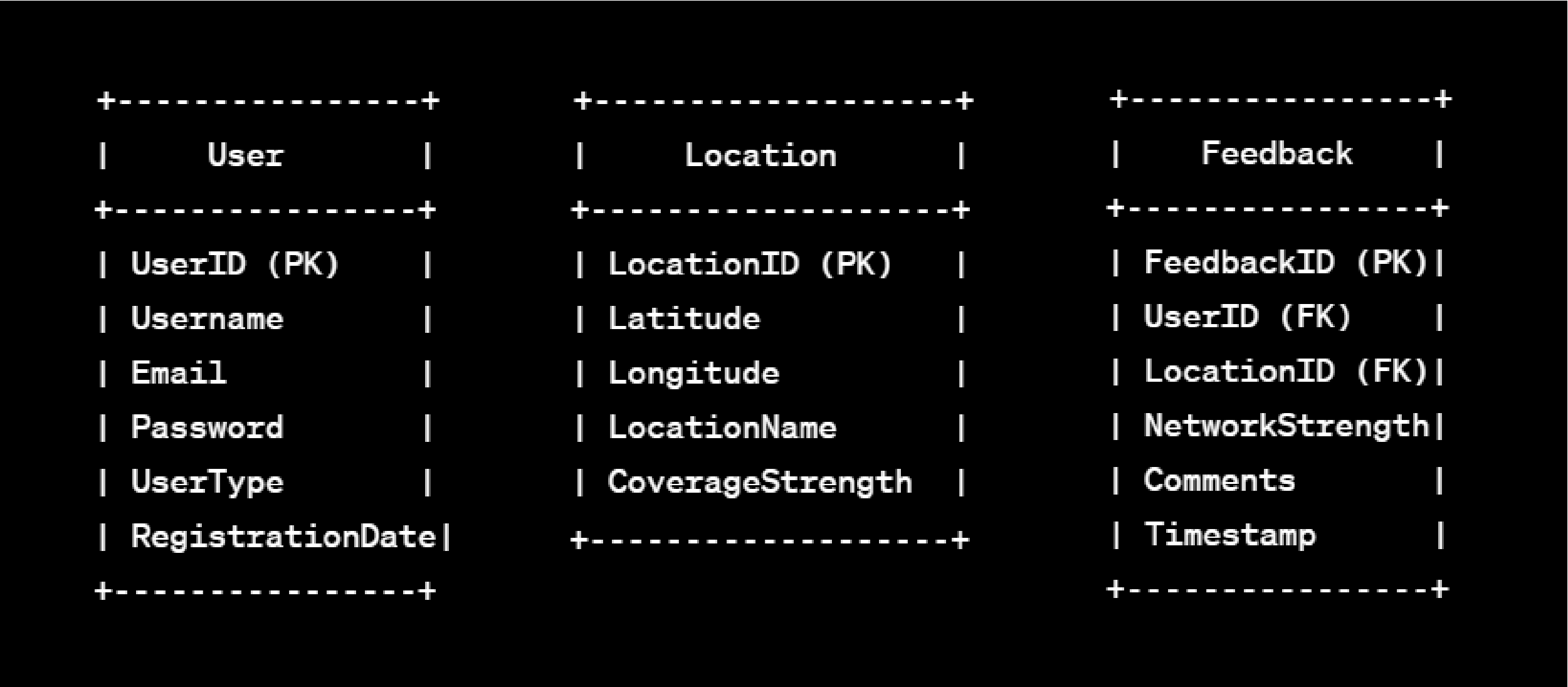
In this model:
- The User and Location entities represent the core entities in the app.
- The Feedback entity connects users and locations, capturing the user’s experience and feedback at a specific location.
This is a basic example, and in a real-world scenario, you might need to expand and customize the data model based on additional features and requirements of your app. Consider factors like network provider information, historical data, or additional details about the coverage areas.
Conclusion: Empowering Connectivity for a Connected Tomorrow

The Network Coverage Map App, fueled by the synergy of AI and No-Code technology, has transformative potential. Beyond its role as a valuable decision-making tool, this app has become a dynamic force for positive change in the realm of telecommunications.
In embracing the potent combination of AI and No-Code development, we invite you to embark on a journey of innovation and adaptability. Regular updates based on user feedback, coupled with an unwavering commitment to emerging network dynamics, will ensure the Network Coverage Map App remains at the forefront of connectivity solutions.
Planet Crust’s AI no-code app-builder Aire lets users create custom record-based apps for healthcare directly from AI prompts Users can further customize the AI build with easy-to-use no-code tools, access pre-built apps add connectors and deploy the app in their own instance. We’ll be launching Aire soon! Join the waiting list to get first access.
